¶ Screenarchery / Virtual Photography Tools
Non-exhaustive list of mods and tools for taking pictures in game.
(This is a catch-all reference page until the screen archery tutorial section is ready to be published. Or maybe forever.)
¶ External tools
-
Baldur’s Gate 3 Photomode Tools by Otis_Inf
- REQUIRES at least one month Patreon subscription = ~5€/$6.50
- Allows fine control of the camera, resolution hotsampling, game pause and a lot more
- Please read its documentaion first and then common issues which are listed below
-
IGCS Depth of Field by Otis_Inf
- A DOF / bokeh option for use with ReShade and Otis tools
- Please read its documentaion first and then common issues which are listed below
-
- An anlternative for IGCS Depth of Field. Works faster, but in some cases you need to slow it down
-
Reshade by crosire
- A post-processing tool for games. Allows you to apply different effects and colors on top of the game
How to install ReShade
How to install shaders
- A post-processing tool for games. Allows you to apply different effects and colors on top of the game
-
SRWE by dtgDTGdt, Otis_Inf, ghostinthecamera, The-SamminAter
- For hotsampling if you don’t have Otis_Inf Baldur’s Gate 3 Photomode Tools
¶ Backbone Mods / Tools
-
Script Extender by Norbyte
- Required framework for most tools. Also allows you to open the console so you can input commands.
-
MCM (Mod Configuration Menu) by Volitio
- Required UI framework for most of the following mods.
-
EasyCheat by Aahz
- In-game UI that lets you access cheaty things. Includes searchable item spawner and a teleport feature that takes you to any in-game trigger point.
-
Native Camera Tweaks by Ershin
- Native open source plugin providing several camera tweaks. Unlocked camera pitch, zoom, controller stick deadzone
-
WASD Character Movement by Ch4nKyy
- Makes moving around for photography easier, especially if using EasyCheat to teleport to certain locations which don’t have a “ground” to click on
-
Lighty Lights by rakor
- Tool that lets you create and position light sources. Also lets you change the lighting and atmosphere in the game (works in most base-game levels and in some custom levels). Also lets you adjust poses (to some extent) in game.
-
Backgrounds by rakor
- Tool that lets you create backgrounds and simple objects.
-
QSAT (Quick Small Animation Thingy) by rakor
- Tool that lets you play any in-game or modded animation/pose without a patch. Also allows you to play tail, wing, and face animations separately.
-
Move Here by rakor
- Tool for positioning objects and characters.
-
Pretty Particles by scarstarion
- Create pretty particles!


- Create pretty particles!
-
- Fixes a bug that causes a few creatures to not enter photo mode properly.
¶ Supplemental for Scenery / Characters
-
- To change appearance of your characters and companions and also apply cool parameters like hair wind, etc
-
Appearance Edit Enhanced + Origins addon
- Allows changing the appearance of companions
¶ Unique Locations / Custom VP Maps
- AxiAU: Barovia
- Four locations from the Curse of Strahd D&D module: The Gates of Barovia, the crossroads, Baba Lysaga’s creeping hut, and Madam Eva’s Vistani camp. Lighty Lights’ AnL supported.
- AxiAU: Waterdeep
- Full build of Gale’s tower in Waterdeep. Entry/hall, kitchen/dining area, guest room with bathroom, parlor, master suite with bathroom, two patios, Serafina’s walk-in closet with teleport to her pocket realm goddess cave, courtyard. Also includes street with park, bookstore cafe, apartments. Lighty Lights’ AnL supported.
- AxiAU: Zen
- Three locations: Tree-lined path (spring and fall), private island / beach house, Japanese garden. Lighty Lights’ AnL supported.
- Gale’s Extended Tower
- Partial build of Gale’s tower in Waterdeep. Antechamber, bedroom, stairs.
- Lenore’s Grotto
- Edit of the Sharran grotto in Act 3.
- Photobooth
- Adds several areas with three lighting/atmosphere options for each (day, sunset, night). Beach waypoint: Beach, pool, bard stage/courtyard, garden house, hot springs waterfall, private campsite, forest path. Monastery waypoint: library, carriage courtyard, chapel, dining hall, courtyard with stream, formal bedchambers. Also has special launch party venue and private camp with individually-decorated rooms.
- Serafina and Gale’s Elysian Summer Home
- An open-air palace built in God Gale’s Elysium. Bedroom, library, ballroom, pool, courtyard. Lighty Lights’ AnL supported.
- Snapshots by rdekarios
- Lets you access 45 of the game’s hard-to-access, unseen- and cutscene-exclusive locations, and makes them walkable. Lighty Lights’ AnL not supported, but includes several lighting and atmosphere options (can be mixed and matched) for all locations.
- The Unspoken Horizons
- Add a bunch of random places rakor made for one-off shots. Snow level, train, flower field, night sea, etc.
- Vampire Palace
- Edit of Cazador’s palace.
¶ Poses / Expressions for Photo Mode
Many will need a patch to work together:
Faerun Fashionistas Mega Pose Patch or Pose Mod Compatibility Patch or just use QSAT
¶ Poses
¶ Expressions
Short list (click me)
¶ Nexus
¶ Visuals/Textures/Models
¶ Useful resources
-
All Act 1 and Act 2 locations (slowly adding all Act 3 ones)
¶ Useful links
-
ReShade guides
ReShade Basics by Marty -
Good VP YouTube guides by Shinobi’s Virtual Photography:
How to Learn Virtual Photography
What are Narrative Shots in Photography
How to Unlock your Creativity
6 Classic Mistakes in Virtual Photography -
More useful info:
https://framedsc.com/basics.htm
¶ Mods guides
¶ Lighty Lights
- BG3 Photomode Tutorial: LIGHTY LIGHTS!!! by Axianaa
- New BG3 VP tutorial by Tina
- Lighty Lights Tutorial by HastursQueen
¶ Backgrounds
- Backgrounds Tutorial by HastursQueen
- How to create a neon sign using backgrounds and lighty lights by Tina
¶ Easy Cheat
¶ Move Here
¶ QSAT
¶ Everything at once
¶ Tips
-
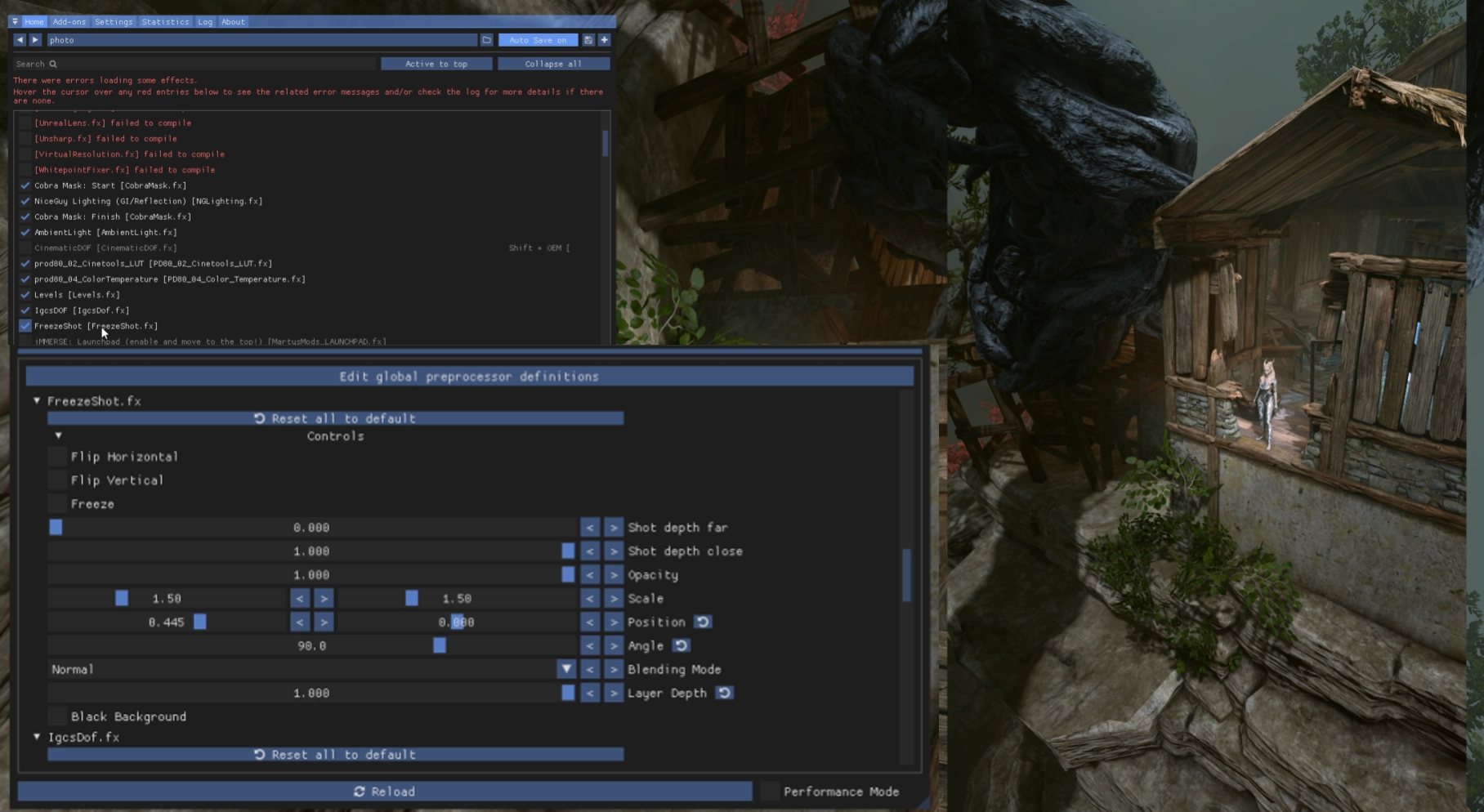
In portrait-angled camera, you can use FreezeShot shader to flip the image
-
To avoid annoying-stacking-on-each-other shadows whicj can appear if you are too close to an object/character, or some where in the background, you can disable ambient occlusion and instead use any ReShade AOs

-
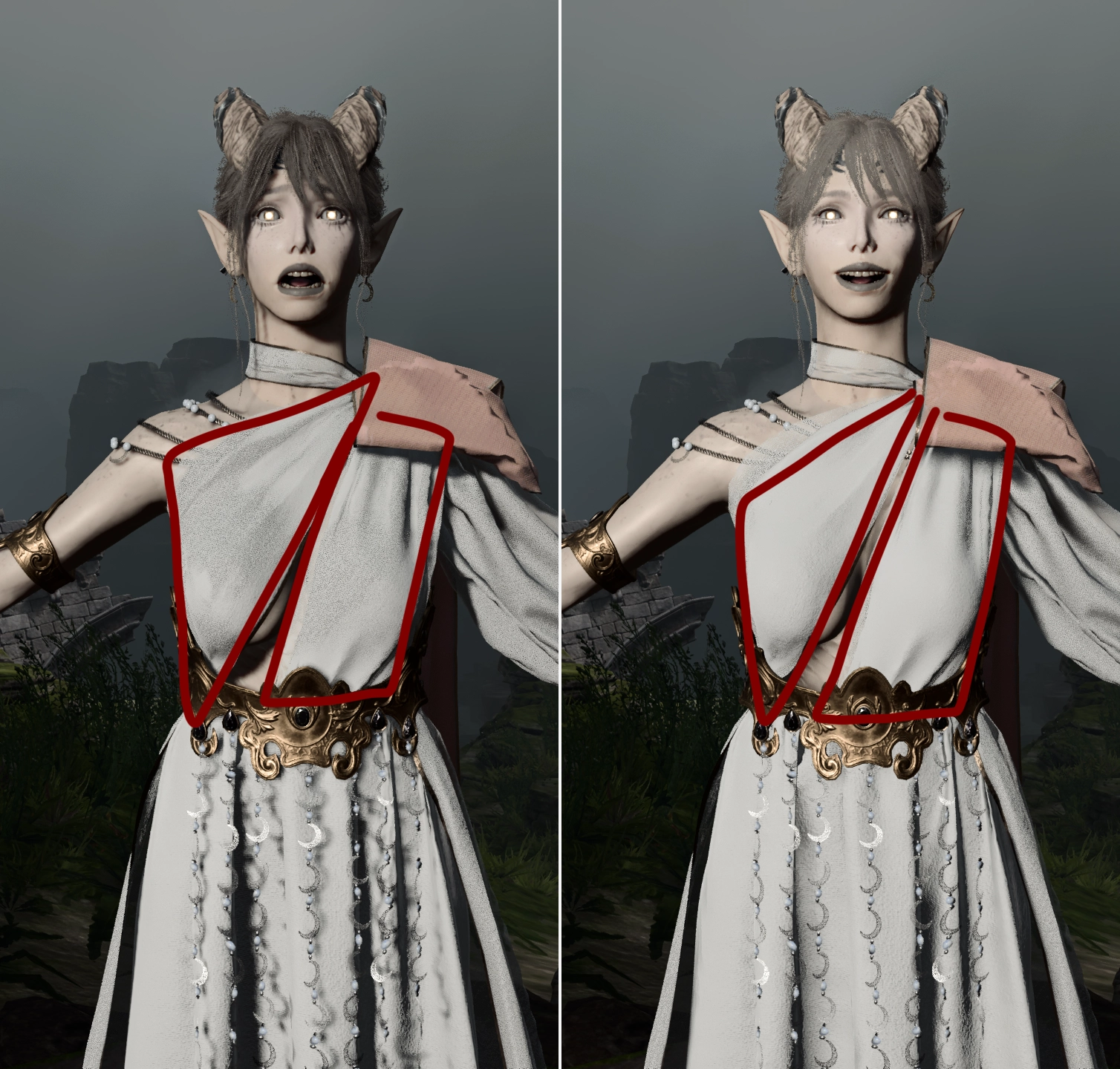
To avoid shadows which appear on transparent materials, you need to increase the outer angle of light, either by increasing outer angle or placing the light further away. Lowering shadows quality also a bit helps, but I wouldn’t recommend doing so, only in some very specific scenarios
-
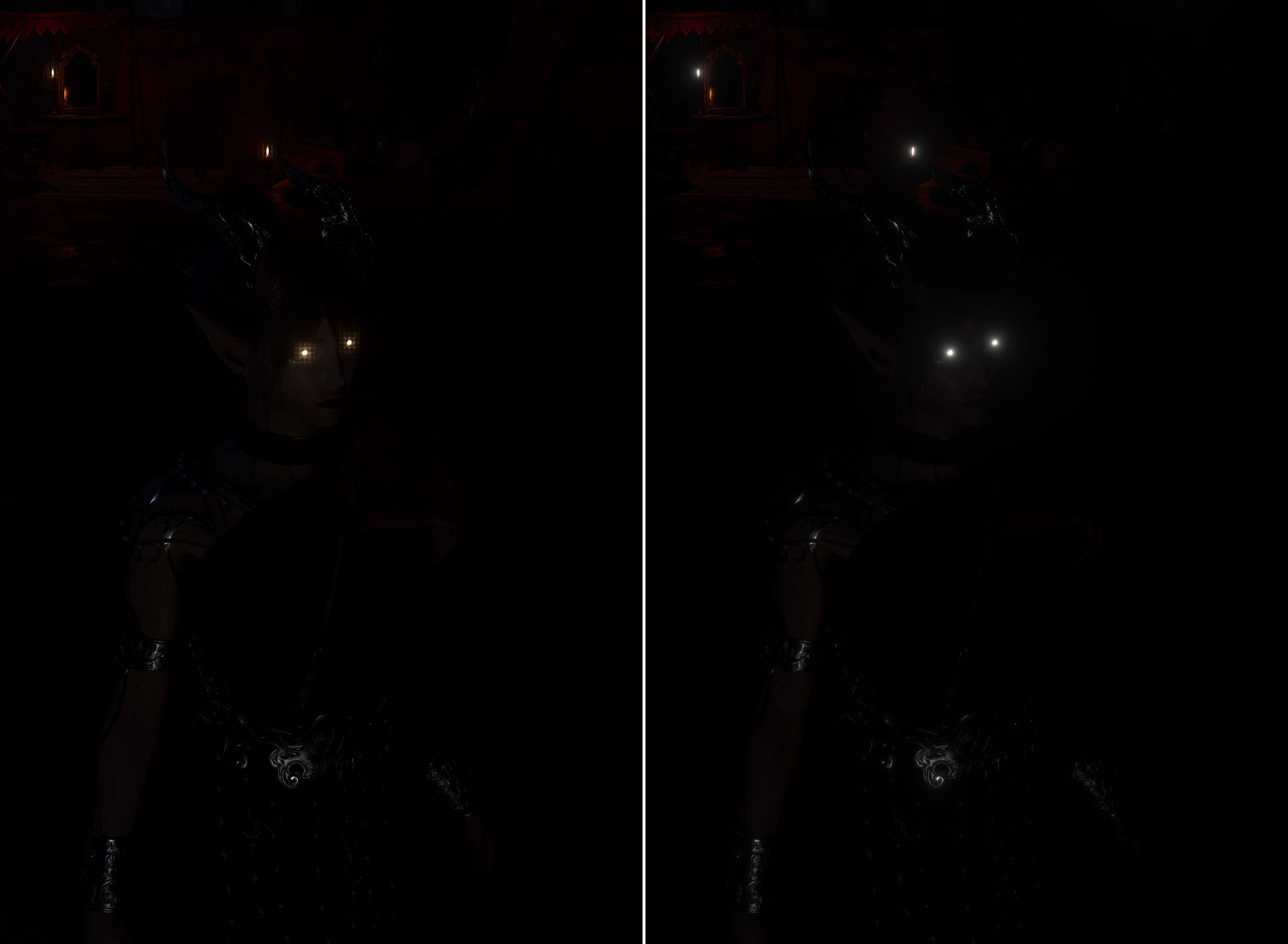
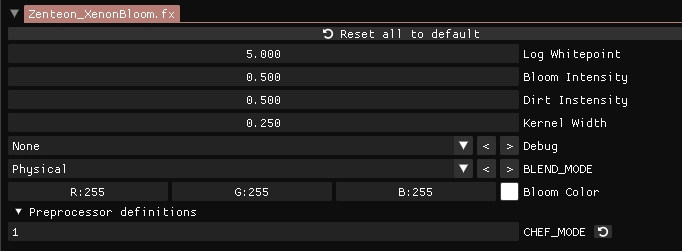
Default bloom has artifacts when upscaling resolution; to avoid them, use Zenteon Xenon or any ReShade blooms
¶ Common issues
¶ You is not able to read
- It is what it is, it happens sometimes. Each tool has its own wiki/documentation, you just need to use google occasionally
¶ General
- Screenshots have washed/gray colors: disable HDR in windows and make sure you don’t have any HDR addons enabled in ReShade
¶ ReShade
-
Any shader that relies on depth buffer (like DoF (except IGCS DoF), AO, GI, Fog, etc) acting weird, can’t be properly adjusted and so on:
Make sure you set up depth buffer correctly: inEdit global preprocessor definitionsset
RESHADE_DEPTH_LINEARIZATION_LINEARIZATION_FAR_PLANE = 1000
RESHADE_DEPTH_INPUT_IS_UPISDE_DOWN = 0
RESHADE_DEPTH_INPUT_IS_REVERSED = 1
RESHADE_DEPTH_INPUT_IS_LOGARITHMIC = 0
InAdd-onstab checkCopy depth buffer before clear operations -
No depth buffers found: try launching the game in
DX11 mode
¶ Otis_Inf photomode tool
-
No BG3 in the process list: run the tool as
admin -
Game can’t be unpaused: change game speed in the tool using the slider
-
Camera acting weird, getting stuck and so on: probably the game is paused
-
When hotsampling, the game is still in native resolution: switch to
windowedorfullscreen -
If SE is console enabled, sometimes hotsampling changes console resolution; possible solutions:
- Disable the console and open it with
ctrl+f12when needed - Before launching the tool, tab in to the game first and then use hotsampling
- Disable the console and open it with
¶ IGCS Depth of Field
-
Image is blurry even though the focal point is correct: switch to
classic modeand set1 frame to wait, make sure you are inwindowed/fullscreen modeandwindow bordersin the tool is unchecked -
Focal point shifts when changing resolution using hotsampling: uncheck
window bordersin the tool -
Purple artifacts: disable HDR
-
The camera is moving when changing Focus delta X, but the second focus overlay is not appearing: disable ReShade performance mode
-
Black screen when launching the game: inject dll or disable IgcsDof.fx; if you close the game while being in the DOF session, it will get stuck
-
Make sure
IgcsDof.fxis the last in the order. (It depends, but you probably don’t know what the fudge you are doing, so keep it last)
¶ Parallax Depth of Feild
- Some objects/parts of the image are blurred weirdly: increase Interval and Delay to 4 frames